English · ภาษาไทย
English
Step 1 — Meet Mokoko
Mokoko is the small green creature near the Menu button at the bottom right of the screen. Hover over it for a summary of everything it tracks, and it will jump up by itself whenever something new appears.
- Dungeon Run Supply — shows how many runs you have available and how many are almost full
- Dance contest — the dance contest event
- Paradox Slot — a lucky mini game played with Gold / DNP / Cash
- Extra Reward Catalog — the extra rewards of every map, and how many maps currently have one
- Item Sources — look up where an item comes from, or Ctrl + right-click any item slot
- Change Look — a red ! means there is something new
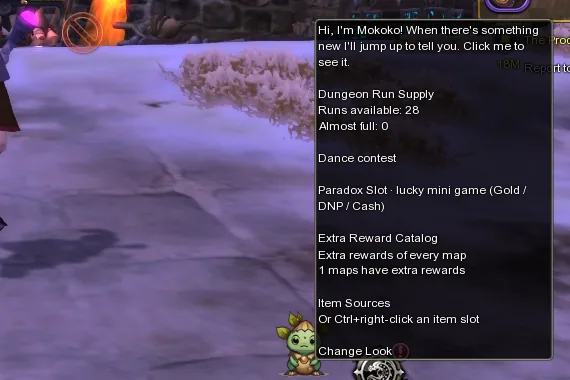
Hover over Mokoko to see the full summary Click Mokoko to open its round menu. Six buttons are available — just click the one you want.
- The text in the middle changes with the button under your cursor; for Item Sources it shows the Ctrl + right-click shortcut
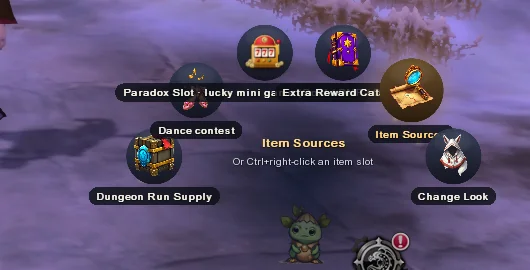
Mokoko’s round menu — Paradox Slot, Extra Reward Catalog, Item Sources, Dance contest, Dungeon Run Supply and Change Look
Step 2 — Dungeon Run Supply
Choose Dungeon Run Supply in Mokoko’s menu to see the run supply for dungeons that hand it out. There are two tabs: Supply dungeons and Other dungeons.
- The bar at the top is the weekly supply schedule (MON–SUN) with today highlighted. Supply this week shows how many times it has been supplied so far
- Next supply shows when the next batch arrives, with a countdown
- Playable now — runs you can play right now (28 in the screenshot), Will overflow — dungeons whose supply is about to be wasted, Used up — dungeons with no runs left
- Filter with All / Event. Each card shows runs left (for example 14 / 56) and how many are added per supply (+14 per supply)
- The Available tag means you can still run it
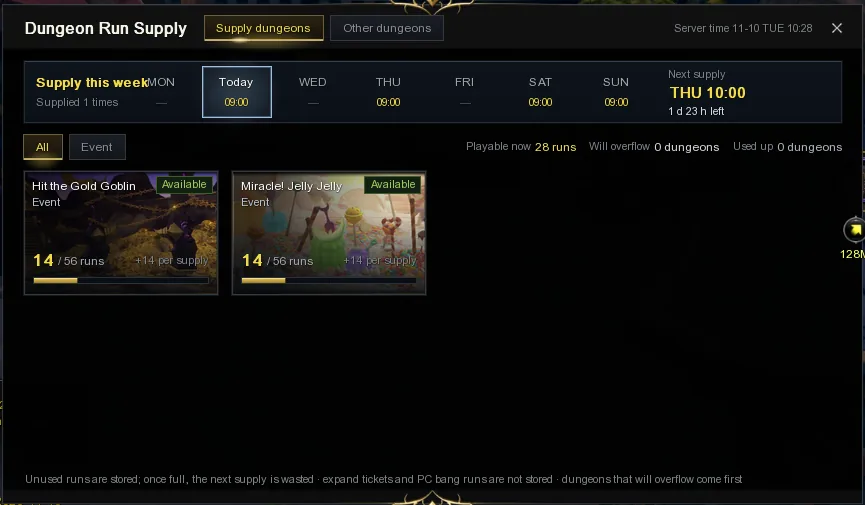
The Dungeon Run Supply window Good to know
Unused runs are stored, but once a dungeon is full the next supply is wasted. Expand tickets and PC bang runs are not stored, and dungeons that will overflow are listed first.
Step 3 — Dance contest
Choose Dance contest, pick a stage, then click Join round there. Six stages are offered.
- 4-WAY and 8-WAY — arrows in four or eight directions
- REVERSE — red arrows mean press the opposite direction
- RANDOM — the arrow order is random
- Each stage shows the week’s top score (Week No.) with the player’s name, and a counter at the bottom right (for example 0 / 30)
- Buttons at the bottom: Ranking shows the leaderboard, Refresh updates the window, Close closes it
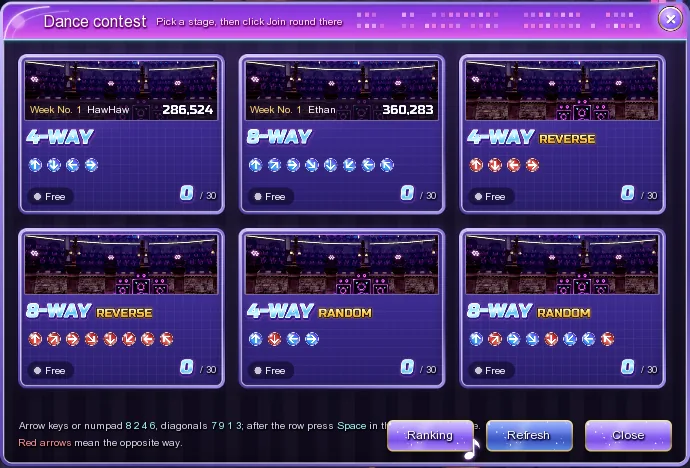
The Dance contest window — six stages Controls
Use the arrow keys or numpad 8 2 4 6 for the main directions and 7 9 1 3 for diagonals. After you finish a row, press Space as the on-screen hint says.
Step 4 — Paradox Slot
Paradox Slot is a 5×3 slot with 20 lines. Pick a currency at the top (DNP or Gold), set your bet and press SPIN.
- Bet / Line — your bet per line, adjusted with − / +. Lines — number of lines (up to 20). Total bet = Bet / Line × Lines (for example 500 × 20 = 10,000 Gold)
- Ticket ×3 — free tickets (Free tickets 3 / 3 per day), Turbo — faster spins, Auto — automatic spins
- Free Spins — free rounds where every win is ×2. Jackpot — grows by 1.5% of every bet
- Daily limits — a cap on your daily bets (Bet 0 / 2,000,000) and spins (Spins 0 / 2,000), resetting at 00:00 WIB
- The History / Today / Winners tabs show your history, today’s results and the winners
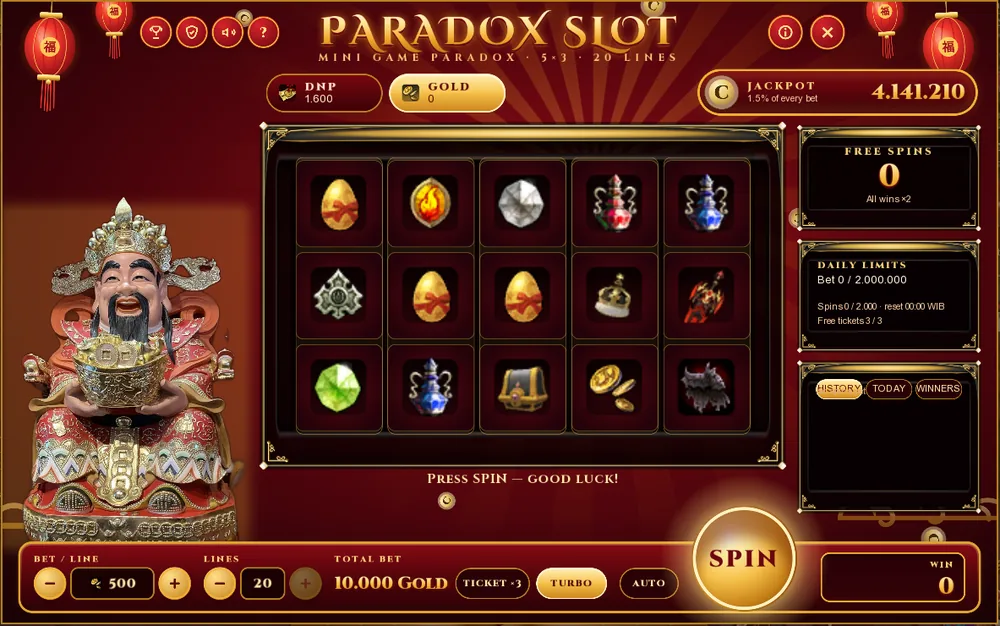
The Paradox Slot window Heads up
Bets spend your real Gold / DNP. Decide a budget first and do not leave Auto running without watching your balance.
Step 5 — Extra Reward Catalog
Choose Extra Reward Catalog to see which maps give extra rewards when cleared. The tabs along the top are All, Nests and Dungeons.
- The top right shows how many maps have a reward and your level (1 maps · Your level 100 in the screenshot)
- Pick a map on the left and its rules appear on the right, for example “Given when you clear this map” and “Any difficulty · roll 1 times”
- Requirements — Players: at least 1, Layer: 100 or higher, Level: 100 or higher (a green dot means you already meet it)
- Possible drops — the items you might receive (11 in the screenshot); use the arrows to change page (1 / 2)
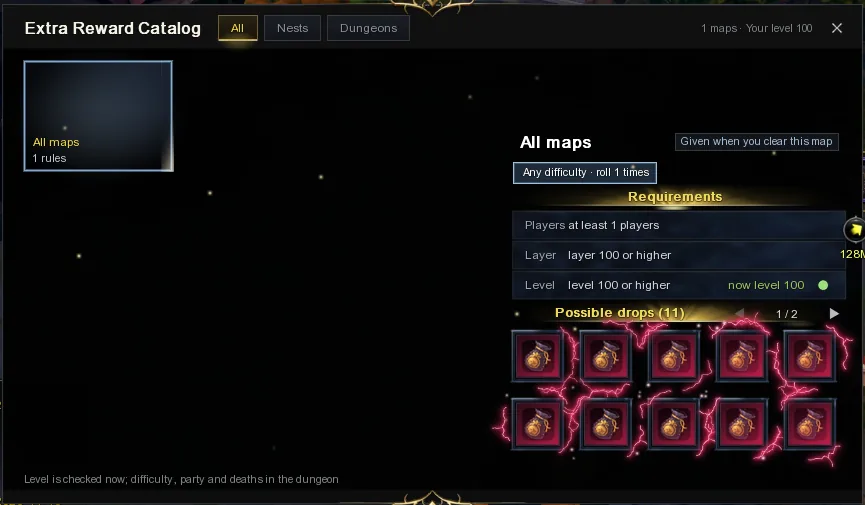
The Extra Reward Catalog window Good to know
Your level is checked right now; difficulty, party and deaths are checked inside the dungeon.
Step 6 — Finding where an item comes from (Item Sources)
Open Item Sources from Mokoko’s menu, or Ctrl + right-click any item slot to look that item up straight away. It works in towns and in dungeons.
- Type an item name in the search box; before you type, a Popular searches list is shown
- Tick My class only to narrow results to your own class
- UI effects switches the window’s visual effects on or off
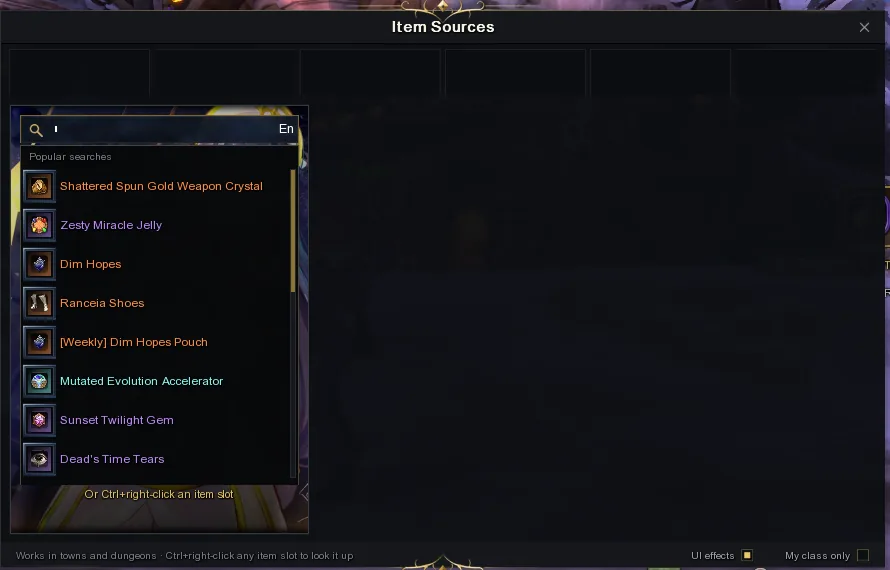
The Item Sources window with its search box and Popular searches Pick an item and the “Ways to get …” page opens, split into All, Monster drops, Clear rewards and Open items tabs, each with a count.
- Each row shows the location, how you get it (for example Monster drop), the difficulty, the boss and the level
- Use the arrows at the bottom to change page (for example 1 / 30)
- Drop chances are not shown
- The list is built when the server starts; time-limited ways only apply while their event is running
- Some rows may read Under Development
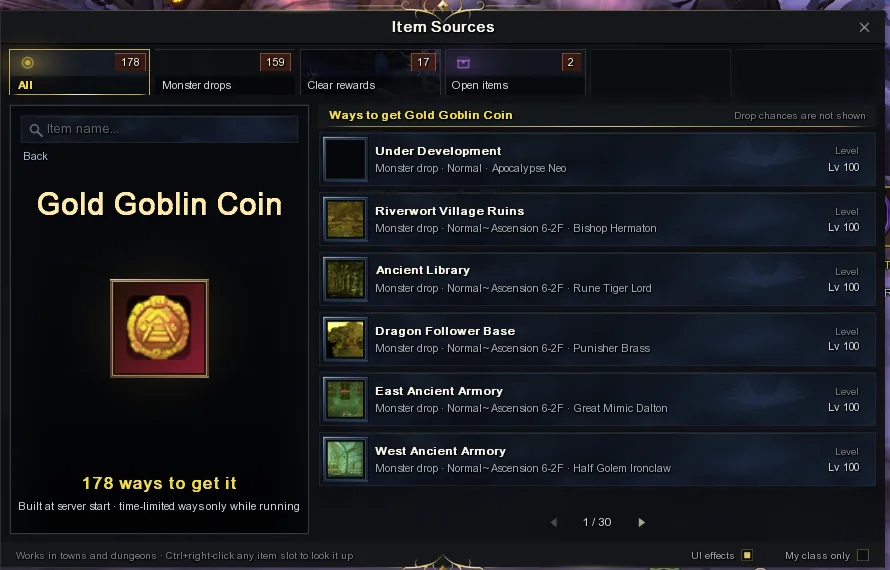
Example: Gold Goblin Coin — 178 ways: Monster drops 159, Clear rewards 17, Open items 2 Tip
Not sure where an item drops? Ctrl + right-click it in your bag — faster than typing its name.
Step 7 — Extra rewards while inside a dungeon
While you are in a dungeon, a timer and an Extra rewards available bar with a number (for example 1/1) sit under the minimap. Click it to see which extra rewards this run qualifies for, without going back to the Mokoko menu.
- The Extra reward window header shows the map and player count (for example Fission Maze · 1 players) and a note that rules that are met are paid at the clear
- Pick the reward set on the left (for example All maps · roll 1 times); the Available tag means it can be received
- Conditions lists each rule with your current value, for example Players at least 1 (now 1), Layer 100 or higher (now 124), Level 100 or higher (now 100). A green dot means you already meet it.
- Possible drops shows the items you might get (11 in the screenshot); use the arrow to change page (1 / 2)
- Press × to close the window
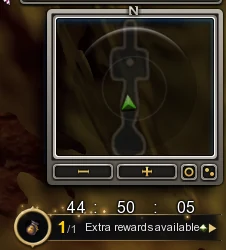
The Extra rewards available bar under the minimap 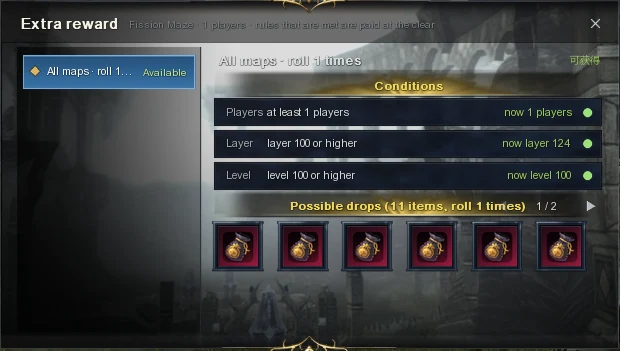
The Extra reward window inside a dungeon
ภาษาไทย
เมนู Mokoko และ Item Sources
รู้จัก Mokoko ตัวช่วยสีเขียวข้างปุ่ม Menu — โควตาดันเจี้ยน ประกวดเต้น สล็อต รางวัลพิเศษ และค้นหาว่าไอเทมหาได้จากไหน
ขั้นที่ 1 — รู้จัก Mokoko
Mokoko คือตัวละครสีเขียวตัวเล็กที่อยู่ใกล้ปุ่ม Menu มุมขวาล่างของหน้าจอ เอาเมาส์ชี้ค้างไว้เพื่อดูสรุปสิ่งที่มันคอยดูแลให้ และเมื่อมีของใหม่ Mokoko จะกระโดดขึ้นมาบอกเอง
- Dungeon Run Supply — แสดงจำนวนรอบที่เล่นได้ (Runs available) และจำนวนที่ใกล้เต็ม (Almost full)
- Dance contest — กิจกรรมประกวดเต้น
- Paradox Slot — มินิเกมลุ้นโชค ใช้ Gold / DNP / Cash
- Extra Reward Catalog — รางวัลพิเศษของทุกแมพ และบอกว่ามีกี่แมพที่มีรางวัลเพิ่ม
- Item Sources — ค้นหาแหล่งที่มาของไอเทม หรือกด Ctrl + คลิกขวาที่ช่องไอเทม
- Change Look — ถ้ามีเครื่องหมาย ! สีแดง แปลว่ามีการแจ้งเตือน
เอาเมาส์ชี้ที่ Mokoko เพื่อดูสรุปทั้งหมด คลิกที่ Mokoko เพื่อเปิดเมนูวงกลม จะมี 6 ปุ่มให้เลือก คลิกปุ่มที่ต้องการได้เลย
- ข้อความตรงกลางเมนูจะเปลี่ยนตามปุ่มที่เมาส์ชี้ เช่น Item Sources จะแสดงวิธีลัด Ctrl + คลิกขวาที่ช่องไอเทม
เมนูวงกลมของ Mokoko — Paradox Slot, Extra Reward Catalog, Item Sources, Dance contest, Dungeon Run Supply และ Change Look
ขั้นที่ 2 — Dungeon Run Supply (โควตารอบดันเจี้ยน)
เลือก Dungeon Run Supply จากเมนู Mokoko เพื่อดูโควตารอบของดันเจี้ยนที่มีการแจก มี 2 แท็บคือ Supply dungeons และ Other dungeons
- แถบด้านบนคือตารางแจกโควตารายสัปดาห์ (MON–SUN) วันนี้จะถูกไฮไลต์ ส่วน Supply this week บอกว่าสัปดาห์นี้แจกไปแล้วกี่ครั้ง
- Next supply แสดงเวลาแจกครั้งต่อไปพร้อมเวลานับถอยหลัง
- Playable now — จำนวนรอบที่เล่นได้ตอนนี้ (ตัวอย่างในภาพ 28 รอบ), Will overflow — จำนวนดันที่โควตาจะเต็มและล้น, Used up — จำนวนดันที่ใช้โควตาหมดแล้ว
- กรองได้ที่ All / Event แต่ละการ์ดแสดงรอบที่เหลือ (เช่น 14 / 56) และจำนวนที่ได้เพิ่มต่อการแจก (+14 per supply)
- ป้าย Available แปลว่ายังเล่นได้
หน้าต่าง Dungeon Run Supply ข้อควรรู้
โควตาที่ใช้ไม่หมดจะถูกเก็บไว้ แต่ถ้าเต็มแล้ว การแจกครั้งถัดไปจะสูญเปล่า ตั๋ว expand และรอบ PC bang จะไม่ถูกเก็บ และดันที่กำลังจะล้นจะถูกจัดไว้ก่อน
ขั้นที่ 3 — Dance contest (ประกวดเต้น)
เลือก Dance contest แล้วเลือกเวที จากนั้นกด Join round ที่เวทีนั้น มีให้เลือก 6 แบบ
- 4-WAY และ 8-WAY — ลูกศร 4 ทิศ หรือ 8 ทิศ
- REVERSE — ลูกศรสีแดงหมายถึงให้กดทิศตรงข้าม
- RANDOM — ลำดับลูกศรสุ่ม
- แต่ละเวทีแสดงคะแนนสูงสุดของสัปดาห์ (Week No.) พร้อมชื่อผู้เล่น และตัวเลขทางขวาล่าง (เช่น 0 / 30)
- ปุ่มด้านล่าง: Ranking ดูอันดับ, Refresh อัปเดตหน้าจอ, Close ปิดหน้าต่าง
หน้าต่าง Dance contest — 6 เวที วิธีกด
ใช้ปุ่มลูกศร หรือ numpad 8 2 4 6 สำหรับทิศหลัก และ 7 9 1 3 สำหรับทิศเฉียง เมื่อกดครบแถวให้กด Space ตามคำแนะนำบนหน้าจอ
ขั้นที่ 4 — Paradox Slot (มินิเกมลุ้นโชค)
Paradox Slot เป็นสล็อต 5×3 แบบ 20 ไลน์ เลือกสกุลเงินที่ด้านบน (DNP หรือ Gold) ตั้งเดิมพัน แล้วกด SPIN
- Bet / Line — เดิมพันต่อไลน์ ปรับด้วยปุ่ม − / +, Lines — จำนวนไลน์ (สูงสุด 20), Total bet = Bet / Line × Lines (ตัวอย่าง 500 × 20 = 10,000 Gold)
- Ticket ×3 — ตั๋วฟรี (Free tickets 3 / 3 ต่อวัน), Turbo — หมุนเร็ว, Auto — หมุนอัตโนมัติ
- Free Spins — รอบฟรีที่ทุกรางวัลคูณ ×2, Jackpot — สะสม 1.5% ของทุกเดิมพัน
- Daily limits — จำกัดยอดเดิมพันต่อวัน (Bet 0 / 2,000,000) และจำนวนสปิน (Spins 0 / 2,000) รีเซ็ตเวลา 00:00 WIB
- แท็บ History / Today / Winners ดูประวัติของคุณ ของวันนี้ และผู้ชนะ
หน้าต่าง Paradox Slot คำเตือน
การเดิมพันใช้ Gold / DNP จริงของคุณ ตั้งงบไว้ล่วงหน้า และอย่าใช้ Auto โดยไม่ดูยอดคงเหลือ
ขั้นที่ 5 — Extra Reward Catalog (รางวัลพิเศษ)
เลือก Extra Reward Catalog เพื่อดูว่าแมพไหนมีรางวัลเพิ่มตอนเคลียร์ แท็บด้านบนมี All, Nests และ Dungeons
- มุมขวาบนบอกจำนวนแมพที่มีรางวัลและเลเวลของคุณ (ตัวอย่าง 1 maps · Your level 100)
- เลือกแมพทางซ้าย จะเห็นเงื่อนไขทางขวา เช่น “Given when you clear this map” และ “Any difficulty · roll 1 times”
- Requirements — Players อย่างน้อย 1 คน, Layer 100 ขึ้นไป, Level 100 ขึ้นไป (จุดสีเขียวแปลว่าคุณผ่านเงื่อนไขแล้ว)
- Possible drops — รายการของที่อาจได้ (ตัวอย่าง 11 ชิ้น) กดลูกศรเพื่อเปลี่ยนหน้า (1 / 2)
หน้าต่าง Extra Reward Catalog ข้อควรรู้
ระบบตรวจเลเวลตอนนี้เลย ส่วนความยาก ปาร์ตี้ และจำนวนครั้งที่ตายจะถูกตรวจในดันเจี้ยน
ขั้นที่ 6 — ค้นหาแหล่งที่มาของไอเทม (Item Sources)
เปิด Item Sources จากเมนู Mokoko หรือกด Ctrl + คลิกขวาที่ช่องไอเทมใดก็ได้เพื่อดูแหล่งที่มาของชิ้นนั้นทันที ใช้ได้ทั้งในเมืองและในดันเจี้ยน
- พิมพ์ชื่อไอเทมในช่องค้นหา ถ้ายังไม่พิมพ์จะมีรายการ Popular searches ให้เลือก
- ติ๊ก My class only เพื่อกรองให้เหลือเฉพาะที่เกี่ยวกับอาชีพของตัวเอง
- UI effects ใช้เปิด/ปิดเอฟเฟกต์ของหน้าต่าง
หน้าต่าง Item Sources พร้อมช่องค้นหาและ Popular searches เลือกไอเทมที่ต้องการ จะขึ้นหน้า “Ways to get …” แยกเป็นแท็บ All, Monster drops, Clear rewards และ Open items พร้อมจำนวนในแต่ละแท็บ
- แต่ละแถวบอกสถานที่ ประเภทที่ได้ (เช่น Monster drop) ระดับความยาก บอส และเลเวล
- ใช้ลูกศรด้านล่างเพื่อเปลี่ยนหน้า (เช่น 1 / 30)
- ระบบไม่แสดงอัตราดรอป (Drop chances are not shown)
- รายการสร้างตอนเซิร์ฟเวอร์เริ่มทำงาน ช่องทางที่จำกัดเวลาจะใช้ได้เฉพาะตอนที่กิจกรรมเปิดอยู่
- บางรายการอาจขึ้นว่า Under Development
ตัวอย่าง Gold Goblin Coin — 178 ช่องทาง: Monster drops 159, Clear rewards 17, Open items 2 เคล็ดลับ
ไม่รู้ว่าของชิ้นนั้นหาได้จากไหน กด Ctrl + คลิกขวาที่ช่องไอเทมในกระเป๋าจะเร็วกว่าพิมพ์ชื่อค้นหา
ขั้นที่ 7 — Extra rewards ระหว่างอยู่ในดันเจี้ยน
ขณะอยู่ในดันเจี้ยน ใต้มินิแมปจะมีนาฬิกานับเวลา และแถบ Extra rewards available พร้อมตัวเลข (เช่น 1/1) กดแถบนี้เพื่อดูว่ารอบนี้เข้าเงื่อนไขรางวัลพิเศษอะไรบ้าง โดยไม่ต้องกลับไปเปิดเมนู Mokoko
- หัวหน้าต่าง Extra reward บอกแมพและจำนวนผู้เล่น (ตัวอย่าง Fission Maze · 1 players) และข้อความว่ากฎที่ผ่านเงื่อนไขจะจ่ายรางวัลตอนเคลียร์ (rules that are met are paid at the clear)
- ทางซ้ายเลือกชุดรางวัล (เช่น All maps · roll 1 times) ป้าย Available แปลว่ารับได้
- ส่วน Conditions แสดงเงื่อนไขกับค่าปัจจุบันของคุณ เช่น Players อย่างน้อย 1 คน (ตอนนี้ 1), Layer 100 ขึ้นไป (ตอนนี้ 124), Level 100 ขึ้นไป (ตอนนี้ 100) จุดสีเขียวแปลว่าผ่านแล้ว
- Possible drops แสดงของที่อาจได้ (ตัวอย่าง 11 ชิ้น) ใช้ลูกศรเปลี่ยนหน้า (1 / 2)
- กดปุ่ม × เพื่อปิดหน้าต่าง
แถบ Extra rewards available ใต้มินิแมป หน้าต่าง Extra reward ในดันเจี้ยน