English · ภาษาไทย
English
Step 1 — Using the shop
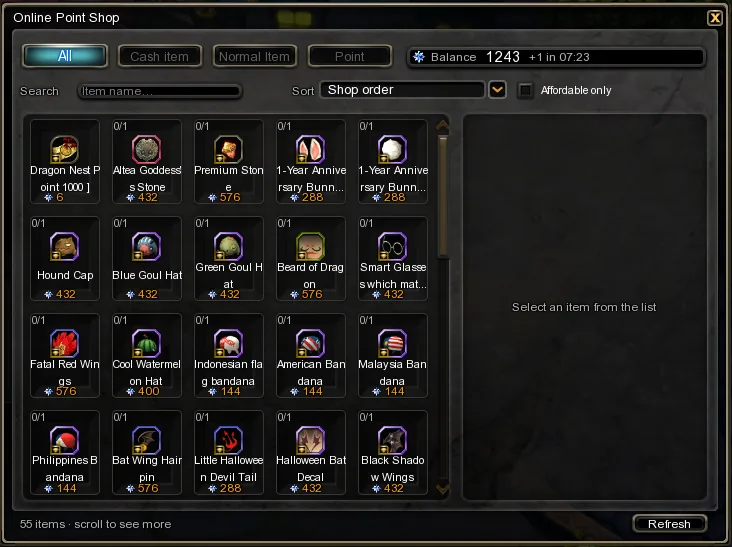
The Online Point Shop is where you spend your online points. Your points are shown as Balance at the top (the same number appears on the star icon beside the minimap).
- Balance carries a +1 in … timer (for example +1 in 07:23), so points go up by one each time it runs out
- The tabs All, Cash item, Normal item and Point filter the stock
- Search by item name, Sort the list (for example Shop order) and tick Affordable only to hide what you cannot pay for
- Each slot shows its price in points, and the small number in the top left (for example 0/1) tracks how many you have bought against the limit
- The bottom shows the total stock (55 items) — scroll for more — and a Refresh button
The Online Point Shop window How to buy
Click an item in the list and its details appear on the right (it reads Select an item from the list until you pick one).
ภาษาไทย
ร้านค้า Online Point Shop
ร้านค้าที่ใช้แต้มออนไลน์ซื้อของ — ดูยอดแต้ม กรองสินค้า และเลือกซื้อ
ขั้นที่ 1 — ใช้ร้านค้า
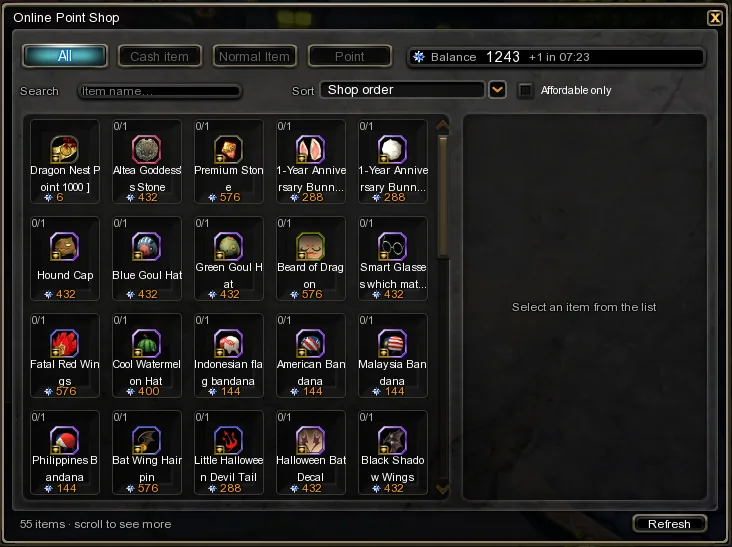
Online Point Shop คือร้านที่ใช้แต้มออนไลน์ซื้อของ ยอดแต้มของคุณอยู่ที่ Balance ด้านบน (ตัวเลขเดียวกันนี้แสดงที่ไอคอนดาวข้างมินิแมป)
- Balance มีข้อความ +1 in … เป็นตัวนับเวลา (ตัวอย่าง +1 in 07:23) แสดงว่าแต้มเพิ่มขึ้นทีละ 1 เมื่อครบเวลา
- แท็บ All, Cash item, Normal item และ Point กรองประเภทสินค้า
- Search ค้นหาจากชื่อไอเทม, Sort เรียงลำดับ (เช่น Shop order) และ Affordable only แสดงเฉพาะที่แต้มพอซื้อ
- แต่ละช่องแสดงราคาเป็นแต้ม และตัวเลขมุมบนซ้าย (เช่น 0/1) ใช้ดูจำนวนที่ซื้อแล้วเทียบกับขีดจำกัด
- ด้านล่างบอกจำนวนสินค้าทั้งหมด (55 items) เลื่อนเพื่อดูเพิ่ม และมีปุ่ม Refresh
หน้าต่าง Online Point Shop วิธีซื้อ
คลิกไอเทมในรายการ รายละเอียดจะแสดงทางขวา (ตอนยังไม่เลือกจะขึ้น Select an item from the list)