English · ภาษาไทย
English
Step 1 — Entering the Lab
Find the Skill Damage Lab icon on the minimap in town. Hover over it to see Open now, the opening hours (Every day all day) and Click to open.
- The Lab is open every day, all day
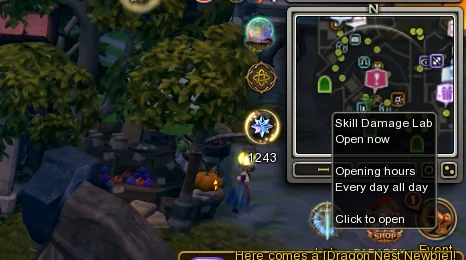
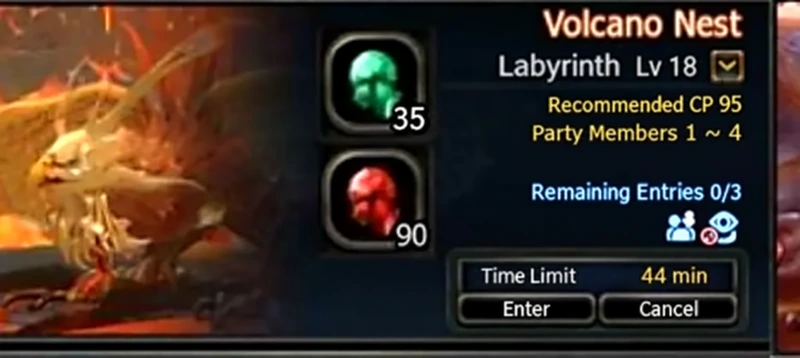
Hover over the Skill Damage Lab icon on the minimap Click it and a confirmation window appears. Press Enter to go in, or Cancel to back out.
- Alone only — you can only go in solo
- Set up your job, skills and gear in town first
- Set a reference dungeon for the difficulty and Ark floor in the Lab panel after you enter
- Damage per skill is shown in the DPS meter
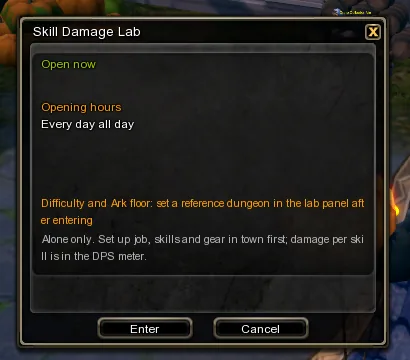
The confirmation window before entering Skill Damage Lab
Step 2 — The Lab panel and DPS meter
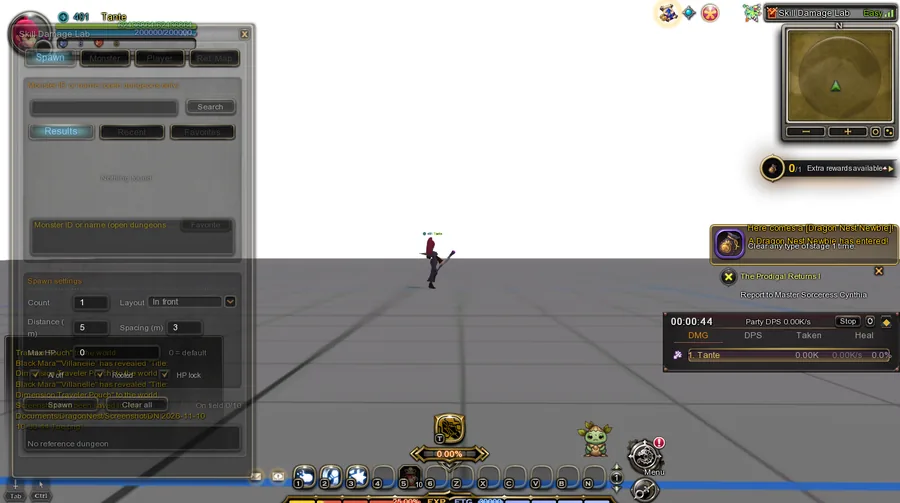
Once inside, the Skill Damage Lab panel sits on the left with four tabs: Spawn, Monster, Player and Ref Map.
- Spawn — summon monsters to test on: search by Monster ID or name (open dungeons only), with Results / Recent / Favorites tabs and a Favorite button
- Spawn settings — Count, Layout (for example In front), Distance (m), Spacing (m) and Max HP (0 = default)
- Options: All off, Rooted (holds monsters in place) and HP lock
- Press Spawn to summon and Clear all to remove everything. On field shows how many are out (up to 10)
- The bottom of the panel shows the reference dungeon (for example No reference dungeon)
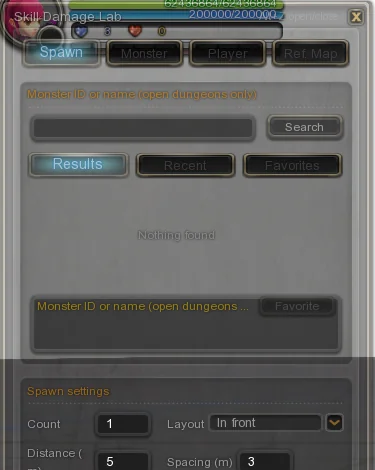
The Skill Damage Lab panel The DPS meter at the bottom right keeps time and has DMG, DPS, Taken and Heal tabs. Press Stop to end the timer.
- It shows total Party DPS and each player’s damage ranking
- Use it to read damage per skill after a test
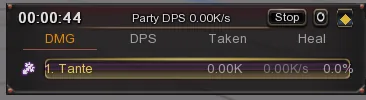
The DPS meter inside the Lab Tip
Finish your job, skill and gear setup in town before going in, so you can spend the whole session testing.
ภาษาไทย
ห้องทดสอบ Skill Damage Lab
ห้องทดสอบสำหรับวัดดาเมจสกิล — เสกมอนสเตอร์ ตั้งค่า แล้วดูผลใน DPS meter
ขั้นที่ 1 — เข้า Lab
หาไอคอน Skill Damage Lab บนมินิแมปในเมือง เอาเมาส์ชี้จะขึ้นข้อความ Open now, เวลาเปิด (Every day all day) และ Click to open
- Lab เปิดทุกวันตลอดวัน
ชี้ที่ไอคอน Skill Damage Lab บนมินิแมป คลิกแล้วจะมีหน้าต่างยืนยัน กด Enter เพื่อเข้า หรือ Cancel เพื่อยกเลิก
- เล่นได้คนเดียวเท่านั้น (Alone only)
- ตั้งอาชีพ สกิล และอุปกรณ์ให้เรียบร้อยในเมืองก่อนเข้า
- ความยากและชั้น Ark ให้ตั้งเป็นดันเจี้ยนอ้างอิงในแผงของ Lab หลังเข้าไปแล้ว
- ดาเมจของแต่ละสกิลดูได้ที่ DPS meter
หน้าต่างยืนยันก่อนเข้า Skill Damage Lab
ขั้นที่ 2 — แผงควบคุมและ DPS meter
เมื่อเข้ามาแล้ว จะมีแผง Skill Damage Lab ทางซ้าย แบ่งเป็นแท็บ Spawn, Monster, Player และ Ref Map
- Spawn — เสกมอนสเตอร์มาตีเพื่อทดสอบ: ค้นหาด้วย Monster ID หรือชื่อ (ใช้ได้เฉพาะดันเจี้ยนเปิด) มีแท็บ Results / Recent / Favorites และปุ่ม Favorite
- Spawn settings — Count จำนวน, Layout การวางตำแหน่ง (เช่น In front), Distance ระยะห่าง (m), Spacing ระยะระหว่างตัว (m), Max HP (0 = ค่าเริ่มต้น)
- ตัวเลือก All off, Rooted (ตรึงมอนสเตอร์) และ HP lock (ล็อก HP)
- กด Spawn เพื่อเสก และ Clear all เพื่อลบทั้งหมด ตัวนับ On field แสดงจำนวนที่อยู่ในสนาม (สูงสุด 10)
- ด้านล่างแผงจะบอกดันเจี้ยนอ้างอิง (ตัวอย่าง: No reference dungeon)
แผงควบคุมของ Skill Damage Lab ที่ขวาล่างคือ DPS meter จับเวลาและแสดงผลแยกแท็บ DMG, DPS, Taken และ Heal กด Stop เพื่อหยุดจับเวลา
- แสดง Party DPS รวม และอันดับดาเมจของแต่ละคน
- ใช้ดูดาเมจต่อสกิลหลังทดสอบเสร็จ
DPS meter ใน Lab เคล็ดลับ
ตั้งค่าอาชีพ สกิล และอุปกรณ์ในเมืองให้เสร็จก่อนเข้า เพราะเข้าไปแล้วใช้เวลาทดสอบได้เต็มที่