English · ภาษาไทย
English
Step 1 — Claiming every reward at once
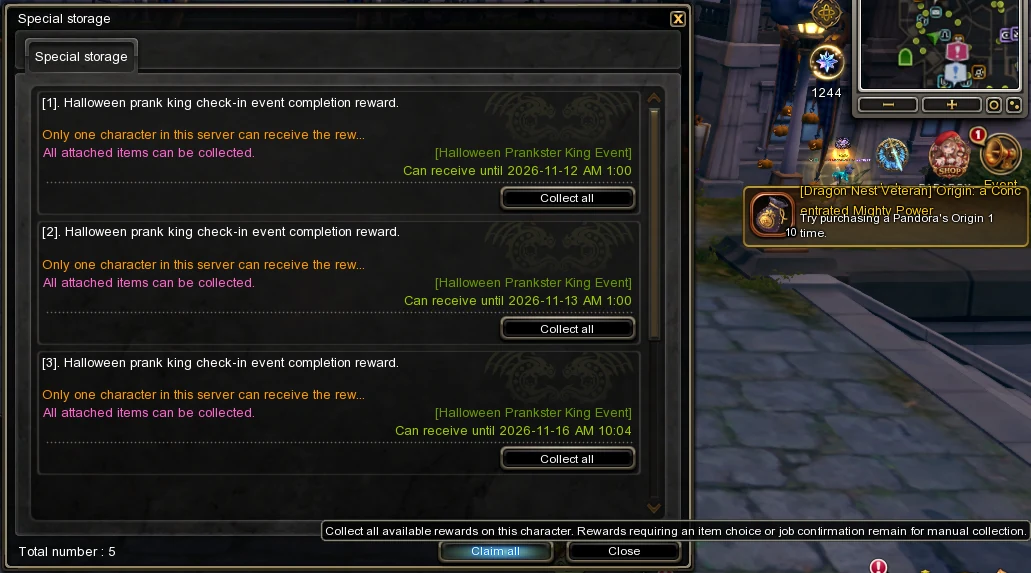
Open the Special storage window to see your pending rewards as a list. Each entry shows where it came from (for example Halloween Prankster King Event or World Daily Tasks) and its deadline (Can receive until …). The Collect all button at the end of an entry claims just that one.
- The orange text Only one character in this server can receive the reward means the reward can only go to one character per server
- All attached items can be collected means every attached item can be taken
- Total number at the bottom left is how many entries are still waiting
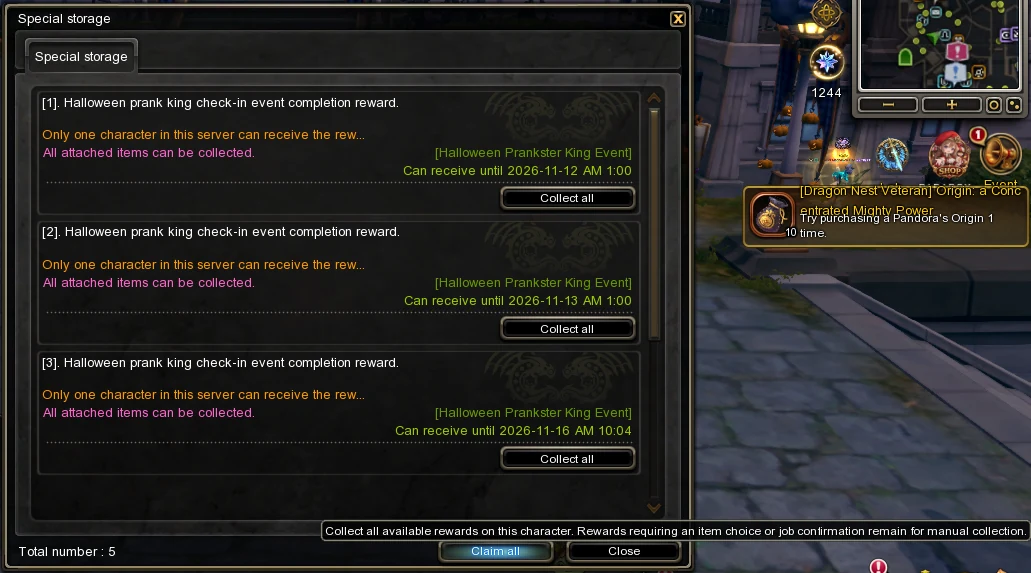
The Special storage window and the Claim all button Press Claim all at the bottom to claim every entry for this character in one go, instead of pressing Collect all one entry at a time.
- Hover over the button for its description: it collects all available rewards on this character, and rewards that need an item choice or a job confirmation stay behind for you to collect manually
- While it works the button reads Claiming… and cannot be pressed again; the list shrinks as rewards are collected
- Press Close when you are done
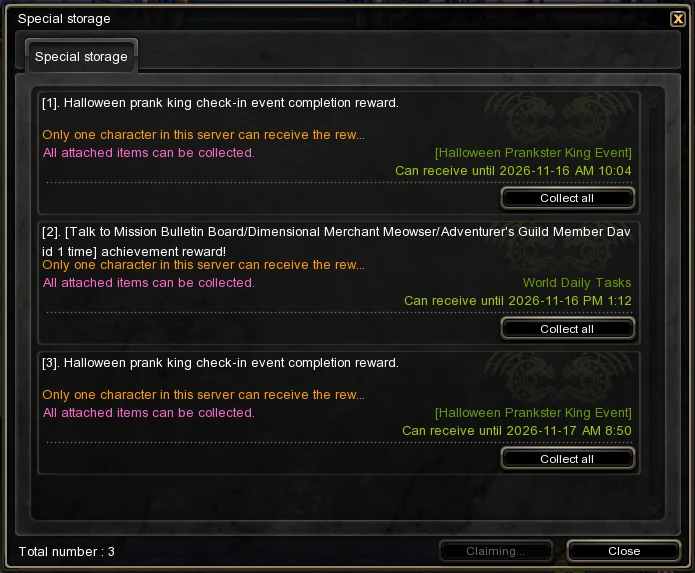
While rewards are being collected, the button shows Claiming… Mind the deadlines
Every entry has its own expiry date, so press Claim all before it runs out.
ภาษาไทย
Special storage — Claim all
รับรางวัลใน Special storage ทั้งหมดด้วยปุ่มเดียว — Claim all
ขั้นที่ 1 — รับรางวัลทั้งหมดในครั้งเดียว
เปิดหน้าต่าง Special storage จะเห็นรางวัลที่รอรับเป็นรายการ แต่ละรายการบอกที่มา (เช่น Halloween Prankster King Event หรือ World Daily Tasks) และเวลาหมดอายุ (Can receive until …) ปุ่ม Collect all ท้ายแต่ละรายการใช้รับรายการนั้น
- ข้อความสีส้ม Only one character in this server can receive the reward แปลว่ารางวัลนี้รับได้เพียงตัวละครเดียวต่อเซิร์ฟเวอร์
- All attached items can be collected บอกว่าไอเทมแนบรับได้ทั้งหมด
- Total number ด้านล่างซ้ายคือจำนวนรายการที่ค้างอยู่
หน้าต่าง Special storage และปุ่ม Claim all กด Claim all ด้านล่างเพื่อรับรางวัลทุกรายการของตัวละครนี้พร้อมกัน แทนการกด Collect all ทีละรายการ
- เอาเมาส์ชี้ปุ่มเพื่อดูคำอธิบาย: รับทุกรางวัลที่รับได้ของตัวละครนี้ ส่วนรางวัลที่ต้องเลือกไอเทมหรือยืนยันอาชีพจะยังอยู่ให้รับเอง
- ระหว่างรับ ปุ่มจะเปลี่ยนเป็น Claiming… และกดซ้ำไม่ได้ รายการจะลดลงเมื่อรับสำเร็จ
- ใช้ Close เพื่อปิดหน้าต่างเมื่อเสร็จ
ระหว่างกำลังรับรางวัล ปุ่มแสดง Claiming… อย่าลืมเวลาหมดอายุ
แต่ละรายการมีวันเวลาหมดสิทธิ์รับของตัวเอง ควรกด Claim all ก่อนหมดเวลา