English · ภาษาไทย
English
Step 1 — Checking your VIP and VVIP grade
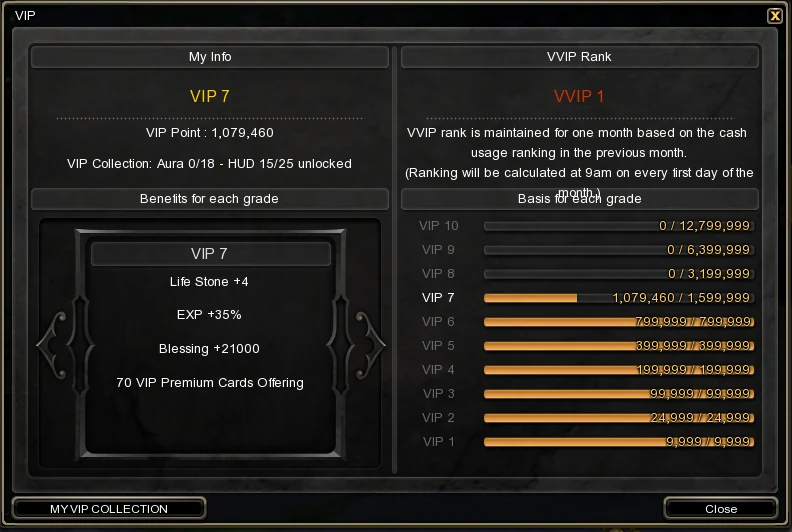
Open the VIP window to see your grade. My Info on the left shows your VIP grade, your VIP Point total and how much of your VIP Collection is unlocked (for example Aura 0/18 – HUD 15/25).
- Benefits for each grade lists what your current grade gives — for example VIP 7 gets Life Stone +4, EXP +35%, Blessing +21000 and 70 VIP Premium Cards Offering
- Basis for each grade on the right shows the points needed for every grade, from VIP 1 (9,999) to VIP 10 (12,799,999), with a progress bar toward the next one
- VVIP Rank is based on the previous month's cash usage ranking and lasts one month; the ranking is calculated at 9am on the first day of every month
- The MYVIP COLLECTION button at the bottom left opens the Collection window
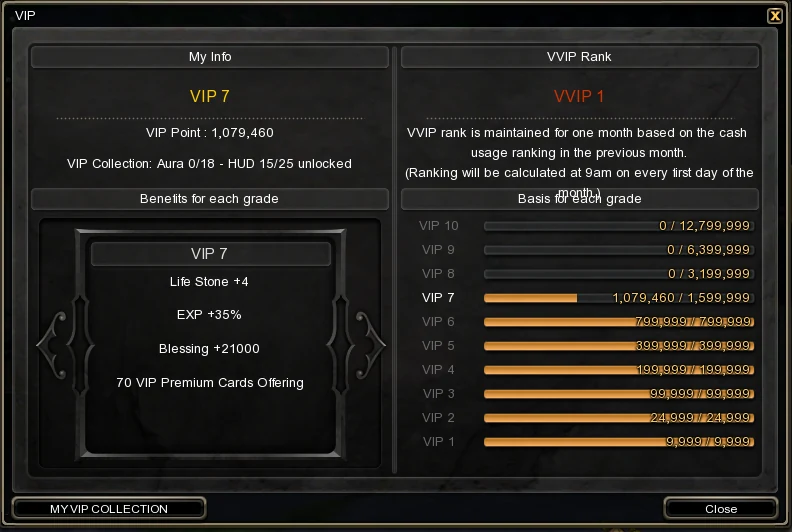
The VIP window showing grade and benefits Points needed per grade
VIP 1 = 9,999 · VIP 2 = 24,999 · VIP 3 = 99,999 · VIP 4 = 199,999 · VIP 5 = 399,999 · VIP 6 = 799,999 · VIP 7 = 1,599,999 · VIP 8 = 3,199,999 · VIP 9 = 6,399,999 · VIP 10 = 12,799,999
Step 2 — The Collection window
Collection stores cosmetic items by category: Aura, Costume, Nickname Font, Damage Font, Avatar Frame, Menu Frame, HUD and Shop. Pick a category on the left; the number beside it (for example 1/20) is how many you own out of the total.
- The top bar shows your VVIP, a Filter VIP button and your DNP and Gold balances
- Collection Score (for example 5,460) is your total score, and Collection Bonus at the bottom is the bonus from every item you own (Max HP, EXP, Critical)
- Click an item in the list to preview it on your character — view it from the front (Depan), back (Belakang) or rotate it (Putar). Your character is not changed yet means nothing is actually equipped.
- Locked items show the VIP/VVIP grade you need (for example VVIP 2). Press EQUIPPED to wear one, or CANCEL to back out.
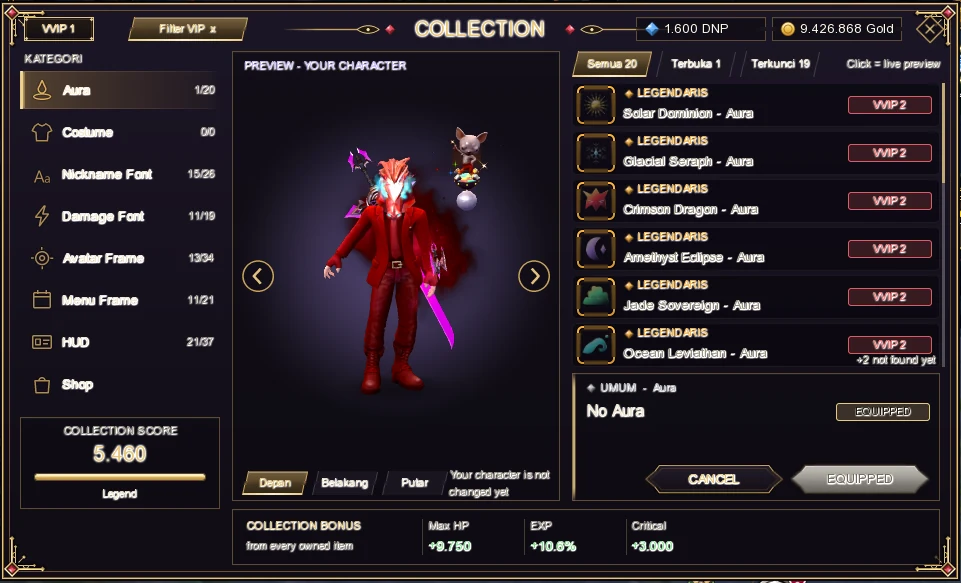
Collection, Aura category, with a live preview on your character Nickname Font changes the colour and effect of your character name. The tabs are Semua (all), Beranimasi (animated), Statis (static) and Dimiliki (owned).
- The detail panel shows the grade and bonus (for example EXP +1.0%) and how other players see it in the Party List, Chat, Ranking Board and Profile Card
- Tick Turn off font animation if you do not want the animation
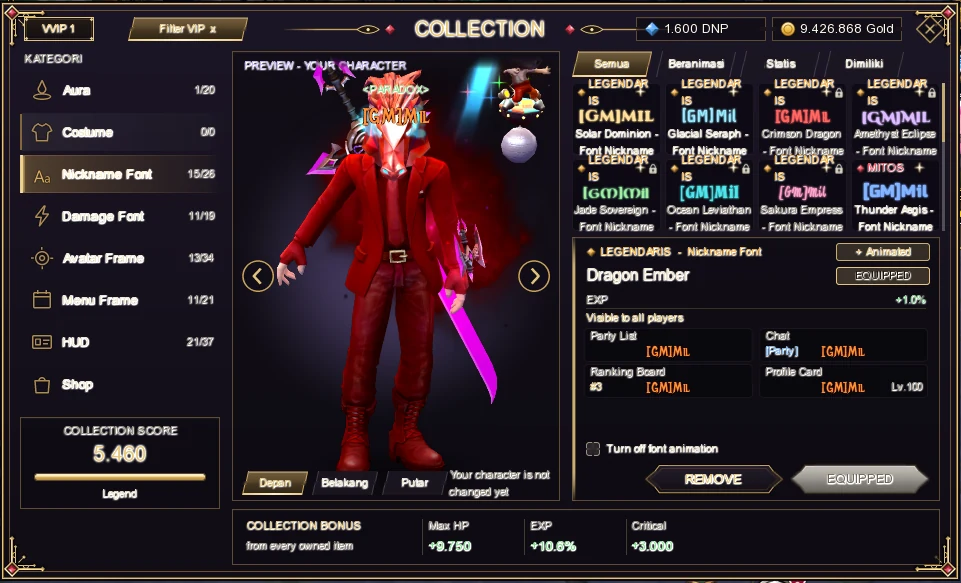
The Nickname Font category Damage Font changes the font of your damage numbers, split into Hit, Critical, Combo and Total.
- Tick Show other players' damage font if you want to see other people's fonts
- Some fonts come from reaching a certain VVIP grade (for example Thunder Aegis is obtained from VVIP 1)
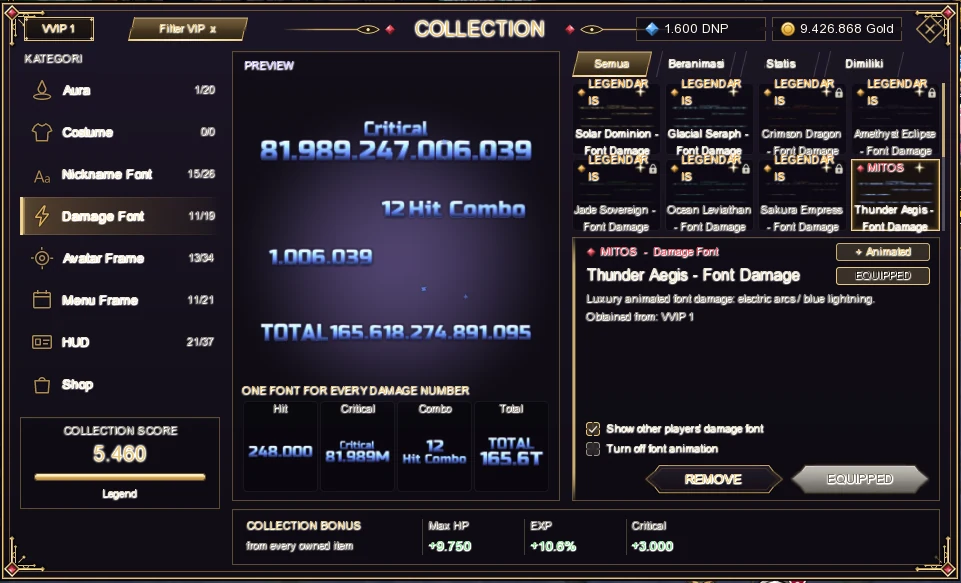
The Damage Font category Avatar Frame changes the frame around your portrait at the top left, and Menu Frame changes the look of window frames, buttons, tabs and panels (the content stays the same).
- For Menu Frame, tick Apply to every window to use it on all windows
- Both categories have a Turn off ... animation option
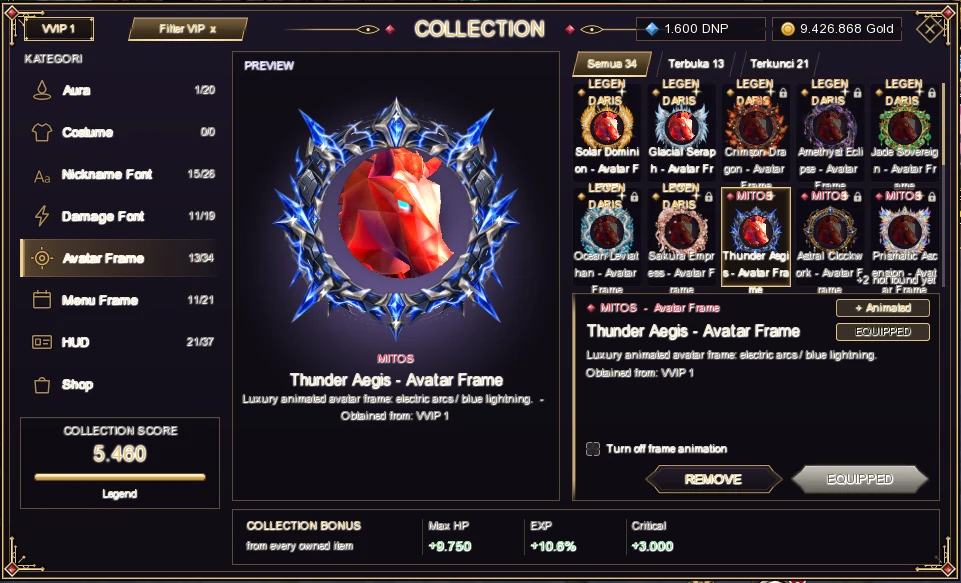
The Avatar Frame category 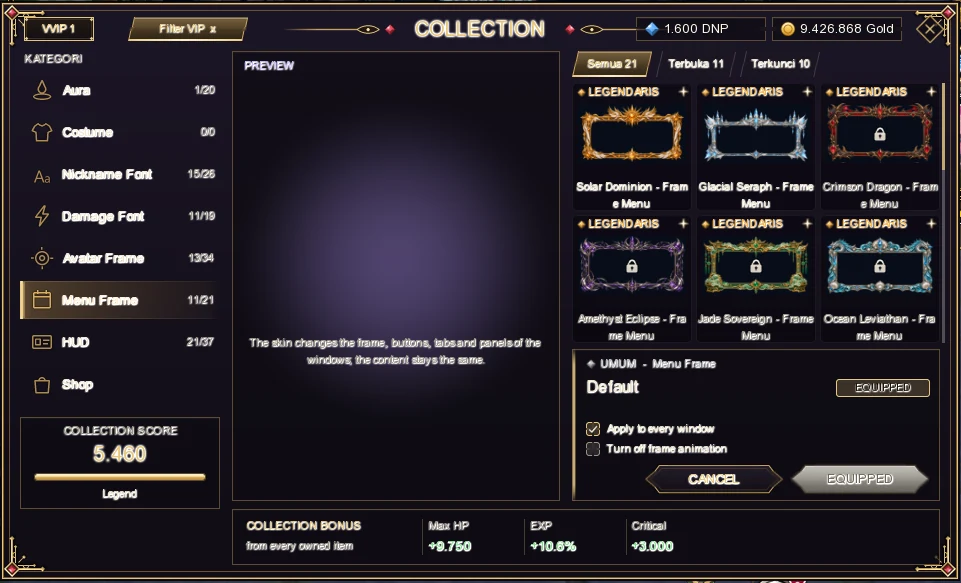
The Menu Frame category HUD has three tabs — HUD Frame, Cursor and Crosshair — which are separate, so you can mix themes.
- The IN USE panel below lists what you are using (Frame HUD, Cursor, Crosshair)
- UNLOCKED means you can use it already; VIP 8 and similar tags show the grade you still need
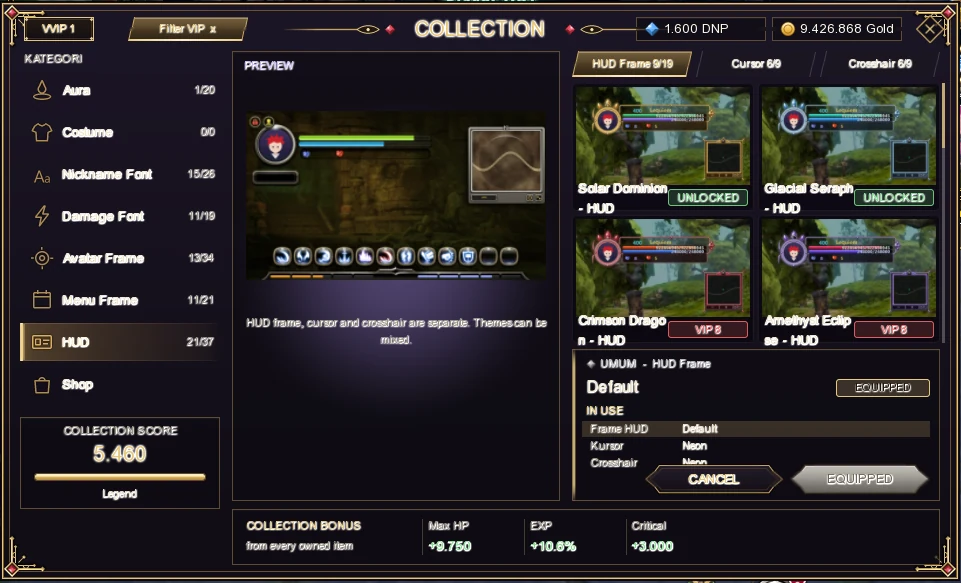
The HUD category
Step 3 — The VIP Shop
The Shop tab has two stores: GENERAL SHOP (pay with Gold / Online Point) and VIP SHOP (pay with DNP / VIP Coupon). The categories on the left are All, Reset, Buff, Gacha Box, Costume and Other.
- Each item has a required grade tag in its top left corner, such as VIP 5 or VVIP 1
- Examples: Reset Nest (20,000 DNP), Fatigue Refill (10,000 DNP), Reset Shop Limit (10,000 DNP + VIP Coupon x1), Reset All Nests (25,000 DNP + VIP Coupon x3)
- Each shows how many purchases you have left, such as 2/2 left this week, and the YOUR VIP box shows your grade and how many items you can use (Available 9/9)
- Your DNP, Gold and VIP Coupon balances are in the bottom bar. Buy limits reset at 06:00; scroll down for more items.
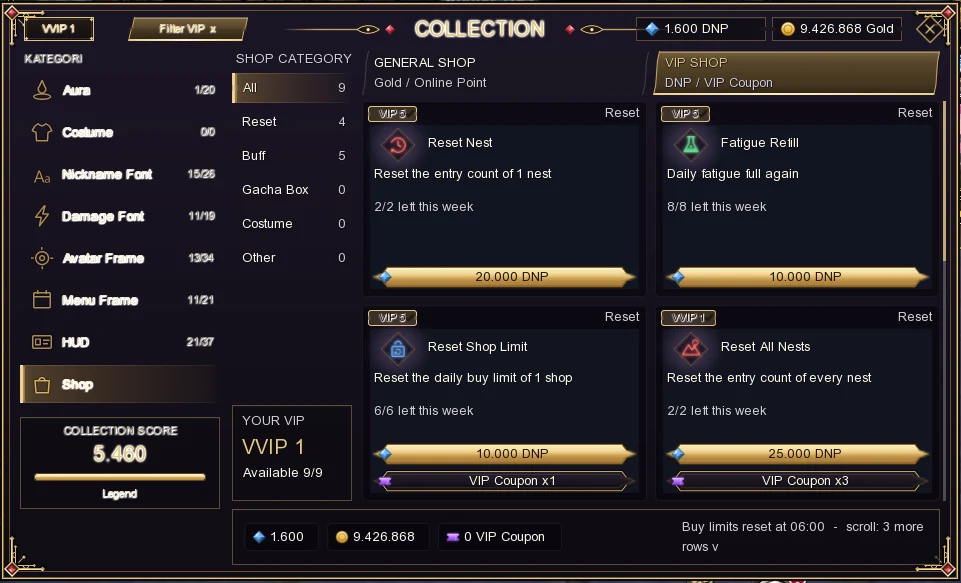
The VIP Shop inside the Collection window
ภาษาไทย
ระบบ VIP และ Collection
ดูระดับ VIP/VVIP สิทธิประโยชน์ และใช้หน้าต่าง Collection กับร้านค้า VIP
ขั้นที่ 1 — ดูระดับ VIP และ VVIP
เปิดหน้าต่าง VIP เพื่อดูระดับของคุณ ฝั่งซ้าย My Info แสดงระดับ VIP, VIP Point และจำนวนของใน VIP Collection ที่ปลดล็อกแล้ว (เช่น Aura 0/18 – HUD 15/25)
- Benefits for each grade แสดงสิทธิประโยชน์ของระดับปัจจุบัน เช่น VIP 7 ได้ Life Stone +4, EXP +35%, Blessing +21000 และ 70 VIP Premium Cards Offering
- ฝั่งขวา Basis for each grade แสดงแต้มที่ต้องใช้ของแต่ละระดับ ตั้งแต่ VIP 1 (9,999) ถึง VIP 10 (12,799,999) พร้อมแถบความคืบหน้าของระดับถัดไป
- VVIP Rank คิดจากอันดับการใช้จ่ายเงินจริงของเดือนก่อน และคงอยู่ 1 เดือน โดยจะคำนวณเวลา 09:00 ของวันที่ 1 ของทุกเดือน
- ปุ่ม MYVIP COLLECTION ด้านล่างซ้ายพาไปหน้าต่าง Collection
หน้าต่าง VIP แสดงระดับและสิทธิประโยชน์ ตารางแต้มของแต่ละระดับ
VIP 1 = 9,999 · VIP 2 = 24,999 · VIP 3 = 99,999 · VIP 4 = 199,999 · VIP 5 = 399,999 · VIP 6 = 799,999 · VIP 7 = 1,599,999 · VIP 8 = 3,199,999 · VIP 9 = 6,399,999 · VIP 10 = 12,799,999
ขั้นที่ 2 — Collection
หน้าต่าง Collection เก็บของตกแต่งไว้เป็นหมวด ได้แก่ Aura, Costume, Nickname Font, Damage Font, Avatar Frame, Menu Frame, HUD และ Shop เลือกหมวดทางซ้าย ตัวเลขท้ายหมวด (เช่น 1/20) คือจำนวนที่มีเทียบกับทั้งหมด
- แถบบนสุดแสดง VVIP ของคุณ ปุ่ม Filter VIP และยอด DNP กับ Gold
- Collection Score (เช่น 5,460) แสดงคะแนนรวม และ Collection Bonus ด้านล่างคือโบนัสจากทุกชิ้นที่มี (Max HP, EXP, Critical)
- คลิกไอเทมในรายการเพื่อดูตัวอย่างบนตัวละคร กดดูได้ทั้งด้านหน้า (Depan) ด้านหลัง (Belakang) หรือหมุน (Putar) ข้อความ Your character is not changed yet แปลว่ายังไม่ได้สวมจริง
- ชิ้นที่ยังล็อกจะแสดงระดับ VIP/VVIP ที่ต้องมี (เช่น VVIP 2) กด EQUIPPED เพื่อสวม หรือ CANCEL เพื่อยกเลิก
Collection หมวด Aura พร้อมตัวอย่างบนตัวละคร Nickname Font เปลี่ยนสีและเอฟเฟกต์ของชื่อตัวละคร มีแท็บ Semua (ทั้งหมด), Beranimasi (มีแอนิเมชัน), Statis (นิ่ง) และ Dimiliki (ที่มีแล้ว)
- แผงรายละเอียดบอกเกรดและโบนัส (เช่น EXP +1.0%) และตัวอย่างที่ผู้เล่นอื่นเห็นใน Party List, Chat, Ranking Board และ Profile Card
- ติ๊ก Turn off font animation หากไม่ต้องการแอนิเมชัน
หมวด Nickname Font Damage Font เปลี่ยนฟอนต์ตัวเลขดาเมจ แยกเป็น Hit, Critical, Combo และ Total
- ติ๊ก Show other players' damage font หากต้องการเห็นฟอนต์ของผู้เล่นคนอื่น
- ฟอนต์บางชิ้นได้จากการถึงระดับ VVIP ที่กำหนด (เช่น Thunder Aegis ได้จาก VVIP 1)
หมวด Damage Font Avatar Frame เปลี่ยนกรอบรูปตัวละครที่มุมซ้ายบน และ Menu Frame เปลี่ยนหน้าตากรอบ ปุ่ม แท็บ และแผงของหน้าต่าง (เนื้อหาเหมือนเดิม)
- Menu Frame ติ๊ก Apply to every window เพื่อใช้กับทุกหน้าต่าง
- ทั้งสองหมวดมีตัวเลือก Turn off ... animation
หมวด Avatar Frame หมวด Menu Frame HUD แบ่งเป็นสามแท็บคือ HUD Frame, Cursor และ Crosshair ซึ่งแยกกันและเลือกผสมธีมได้
- แผง IN USE ด้านล่างแสดงชุดที่ใช้อยู่ (Frame HUD, Kursor, Crosshair)
- ป้าย UNLOCKED คือปลดล็อกแล้ว ส่วน VIP 8 ฯลฯ คือระดับที่ต้องมี
หมวด HUD
ขั้นที่ 3 — ร้านค้า VIP (Shop)
แท็บ Shop มีสองร้านคือ GENERAL SHOP (จ่ายด้วย Gold / Online Point) และ VIP SHOP (จ่ายด้วย DNP / VIP Coupon) หมวดสินค้าทางซ้ายมี All, Reset, Buff, Gacha Box, Costume และ Other
- แต่ละสินค้ามีป้ายระดับที่ต้องมีที่มุมบนซ้าย เช่น VIP 5 หรือ VVIP 1
- ตัวอย่างสินค้า: Reset Nest (20,000 DNP), Fatigue Refill (10,000 DNP), Reset Shop Limit (10,000 DNP + VIP Coupon x1), Reset All Nests (25,000 DNP + VIP Coupon x3)
- บอกจำนวนที่ซื้อได้เหลืออยู่ เช่น 2/2 left this week และกล่อง YOUR VIP แสดงระดับกับจำนวนสินค้าที่ใช้ได้ (Available 9/9)
- ยอด DNP, Gold และ VIP Coupon ของคุณอยู่แถบล่าง ข้อจำกัดการซื้อรีเซ็ตเวลา 06:00 เลื่อนลงเพื่อดูสินค้าเพิ่ม
VIP Shop ในหน้าต่าง Collection